| Outflow Technologies Instructions for Configuring Outlook / Outlook Express. |
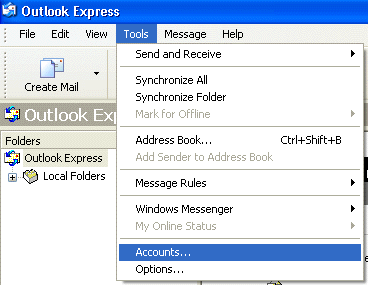
 Choose Tools > click Accounts. Choose Tools > click Accounts.
 |
| |
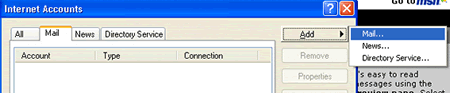
Choose Mail tab > click Add > select & click Mail.
 |
| |
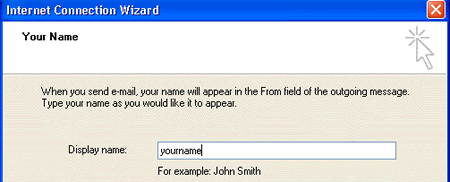
Internet Connection Wizard: Enter your name then click Next.
 |
| |
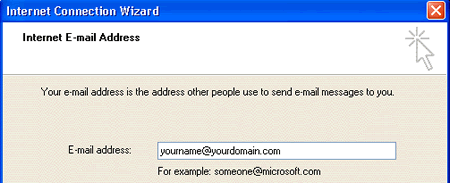
Enter your complete email address then click Next.
 |
| |
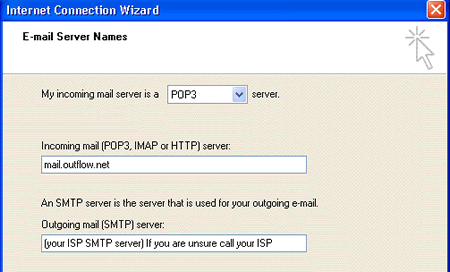
Incomming Mail: enter "mail.outflow.net" (without quotation marks)
Outgoing mail: enter "your ISP SMTP Server"(Internet Service Provider SMTP Server).
A List of popular ISP's. If you are unsure call your Internet Service Provider.
Then click Next.
 |
| |
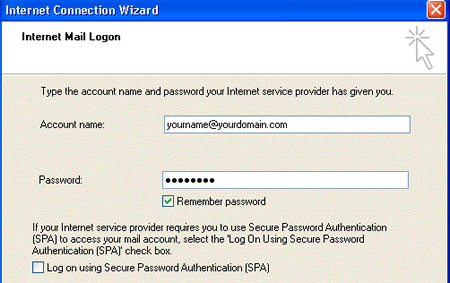
Account Name: Be sure to enter full complete email address including @yourdomain.com. Wizard will initially display just the name without the @yourdomain.com.
Password: Your password for this account name. Then click Next.
 |
| |
| You're done. Click Finish. |